




Mindtickle Sales Enablement Mobile App: How 153K Sellers Always Stay Field-Ready


A field rep walks into a customer meeting. The prospect raises a competitor the rep hasn't prepped for. The battlecard they need is buried in a desktop folder back at the office. The moment passes, so does the deal.
This is the problem every mobile sales enablement app is supposed to solve, but few do.
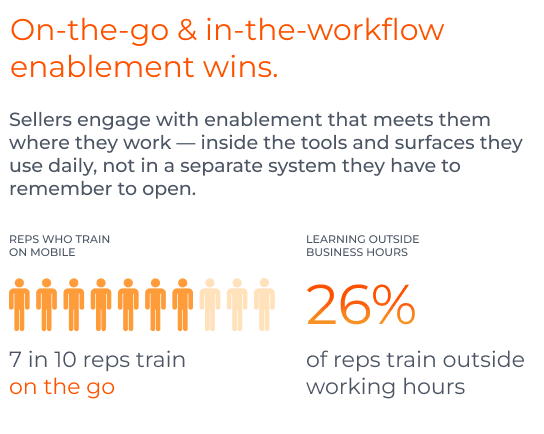
Keeping sellers field-ready — with training, content, and coaching available on the go — directly impacts buyer engagement and deal velocity. With buyers spending just 5% of their time with sellers, it’s clear that deals are won and lost between calls. Sellers racing to hit quota can't wait for a desk. 1.5M sellers used Mindtickle in 2025 — 30% of them were mobile users. This group engaged with enablement two times more than desktop users. Ajitabh Pradhan, Product Manager at Mindtickle, sums up the trend perfectly, "Today's sellers don't sell from desks. They sell from airports, customer lobbies, and between back-to-back meetings." The Mindtickle mobile revenue enablement app is built for exactly that.
What is a sales enablement app?
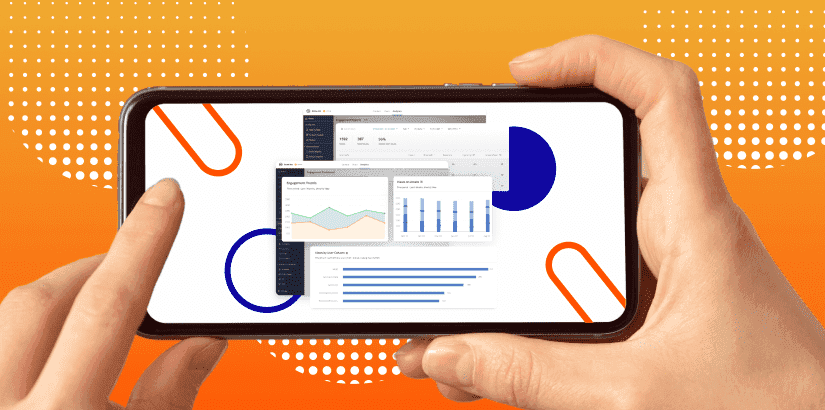
The Mindtickle mobile sales enablement app lets field reps access training, content, AI coaching, and deal management from their phones and tablets — so they can prepare for meetings, practice pitches, and engage buyers from wherever they are, not just from their desk. It runs on iOS and Android, iPads and tablets, works offline, supports 19 languages, and brings everything a rep needs to sell into one app.
1. Always-on readiness
Salesforce data shows reps spend just 30% of their working hours on actual selling activity. The rest goes into finding content, updating CRM records, and chasing down information. A mobile sales enablement app cuts that overhead by putting the right content, context, and coaching in the same place reps already are — their phone.
2. Offline access in low connectivity areas
Sellers often work in low-connectivity zones — airports, medical facilities, manufacturing floors. Offline access is a genuine differentiator.
When AI-powered features like Copilot and AI Roleplays are available offline, field reps can prepare, practice, and refine messaging in the in-between moments of the workday — before meetings, between customer visits, or while traveling — which helps them show up sharper to every buyer interaction. In 2025, reps who did more AI-driven practice also scored higher on live calls and closed more deals, according to our platform data. Top-performing managers leveraged Copilot to auto-grade role play submissions, which means instant feedback, sharper coaching, and no manager fatigue.
3. Scalable, faster program deployment
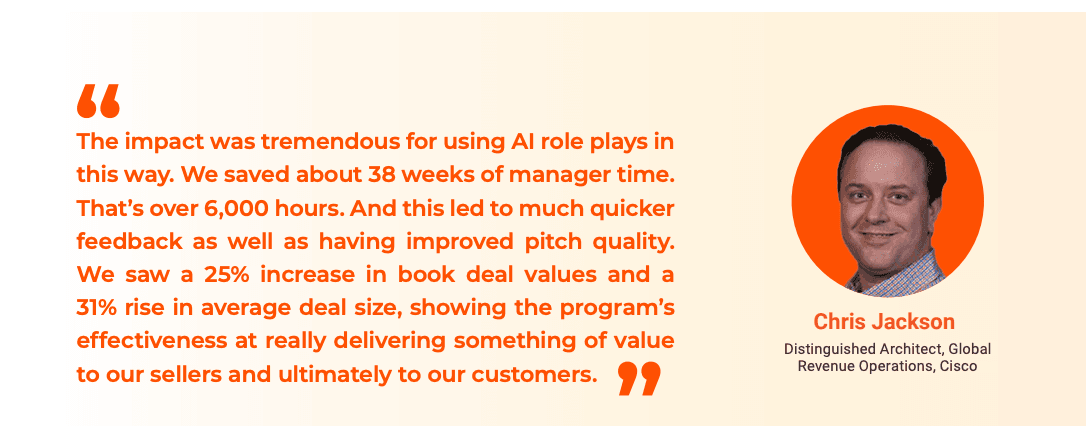
When enablement is mobile-first, adoption follows. A global consumer goods company deployed Mindtickle's mobile solution to 30,000 learners across multiple divisions, cutting rollout time from roughly two years to three months. Cisco could train 18,000 sellers in six weeks, with extremely high adoption rates across the board.
Key capabilities of Mindtickle enablement app
1. AI Seller Copilot: Maintains seller productivity on the go
Personas that Benefit
Primarily Sales Reps (Learners): Seller Copilot equips them with resources to excel in customer meetings and follow-ups.
Managers: Can also benefit with a dedicated Copilot for managers, planned for future releases.
A prepared seller is a productive seller. To keep your teams prepared and productive round the clock, Mindtickle’s AI-powered assistant is available on the go. It delivers instant answers and support across your queries and tasks — in a conversational interface that retains context across sessions. With always-on assistance, teams can spend more time on selling, building customer engagement, and closing deals rather than on admin tasks.
Pre-call preparation
Instead of jumping between different tools to prepare for upcoming calls, your sellers can simply ask the Copilot to summarize and analyze past customer interactions, highlighting relevant context and suggesting next steps. Walk into calls more confidently and drive better outcomes knowing the Copilot is right there to answer all your questions before or during calls.
The best part is that all messages are saved automatically within each chat thread, so you can revisit past conversations anytime. Creating and managing multiple conversation threads is also easy as each thread is saved separately and named based on your first query. This allows you to switch between topics, deals, or customers without losing context or spending too much time searching.
Post-call tasks
Mindtickle’s Copilot automates post-call admin tasks like summarizing the call, sending follow-up emails, and highlighting key moments and action items needing attention. In case output is found to be unsatisfactory, Copilot prompts you for additional feedback, using it for continuous training and improvement.
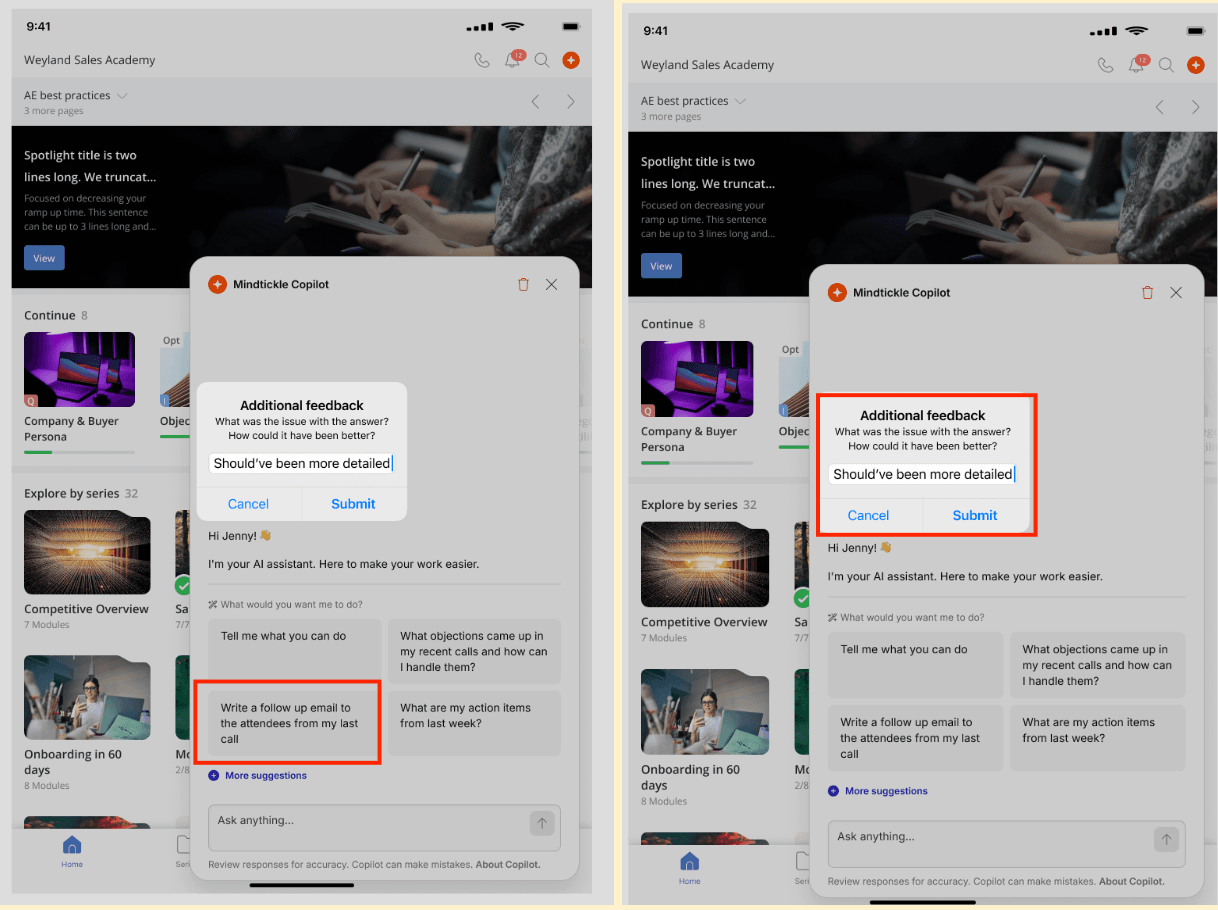
Timely follow-up moves deals forward. It's also one of the first things that slips when sellers are running back-to-back calls. The Copilot handles the repeatable parts — call summaries, action items, next steps — so the rep can send an informed follow-up without starting from scratch.
Instant deal guidance
For anytime, anywhere deal guidance, field reps can access Mindtickle’s Copilot that delivers instant, context-aware responses. You can query about products, processes, customers, and training content, and the Copilot will guide based on modules, assets, and calls accessible to you.
While interacting with Copilot, you can view related sources, copy responses for use elsewhere, provide feedback to improve AI accuracy, and ask follow-up questions to go deeper.
🌟 One Platform, Not Many Apps
On-the-go enablement becomes feasible as Mindtickle brings training, content, DSR, coaching, and AI together on one interface. No app-switching saves time, preserves context, and side-steps latency issues, no matter from where your team operates.
2. AI Roleplays: Practice and review role plays from anywhere
With Mindtickle's revenue enablement app, sellers can practice pitches, handle objections, and rehearse tough conversations with an AI-generated customer — anytime, without waiting on a manager. Every session returns immediate, structured feedback on delivery, keyword usage, and emotional tone.
For reps: Self-coach before submission
When a roleplay mission is assigned, your reps record their pitch directly from the mobile app, no desktop required. Before submitting, they can run AI Insights on their draft, detecting keyword coverage, speech pace, filler word frequency, submission length, and sentiment analysis at both transcript and sentence level. A rep who tends to rush through pricing conversations can see exactly where their pace spikes. One who overuses hedging language can spot it before a manager does. Since the drafts are saved privately, reps can record multiple attempts, compare them, and submit the strongest one.
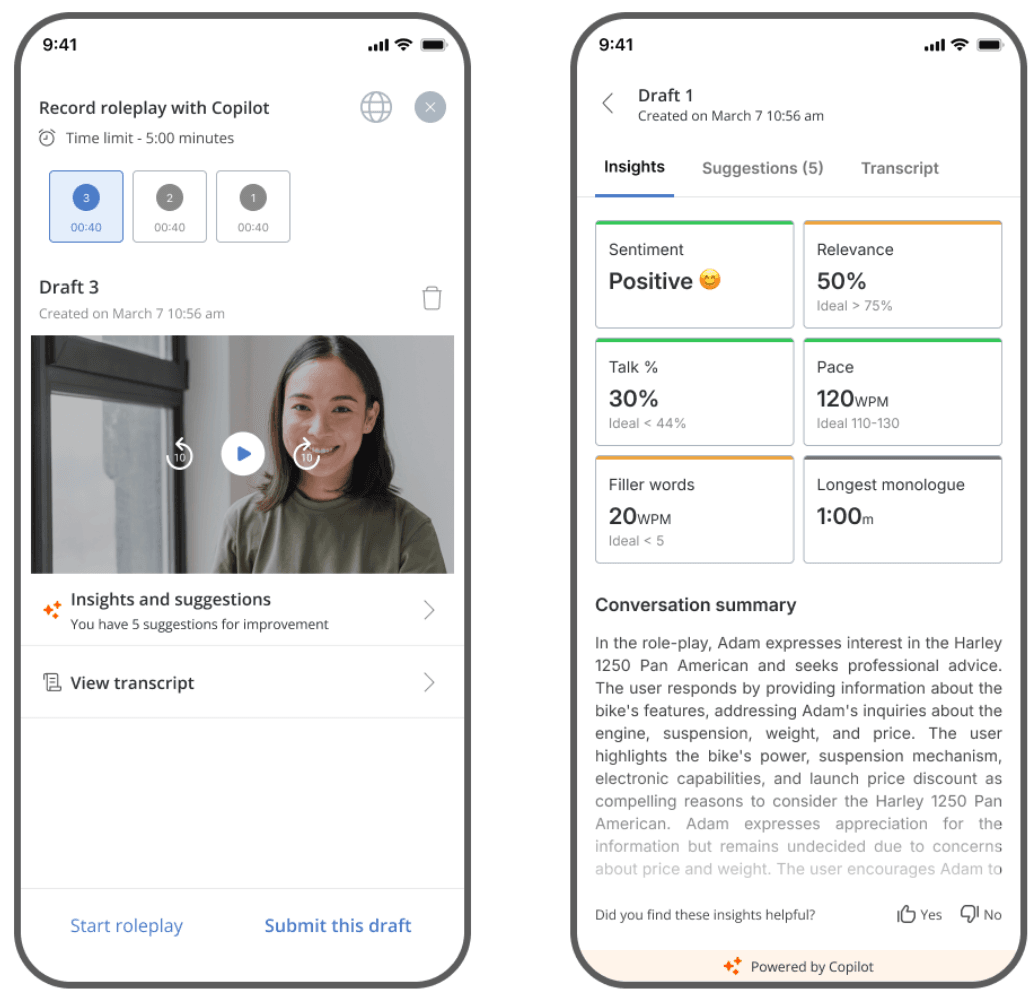
For managers: Review with context, not just gut feel
Managers receive submissions with AI-generated insights already attached — keyword gaps, articulation scores, sentiment flags — so the review starts with data, not a blank screen. As for feedback, it’s structured into positive and constructive sections, with the option to request a re-attempt if the submission doesn't meet the passing threshold.
The result is faster reviews, more specific feedback, and coaching that's tied to observable behavior rather than general impressions.
🎯 How a Fortune 100 Tech Customer Achieved 95% Pitch Participation in SKO
A Fortune 100 tech customer launched a pitch contest with 3,500 sellers submitting 6,000+ pitches on mobile during annual SKO. AI graded every submission with keyword, delivery, and sentiment feedback, achieving 95% participation and an engaging SKO.
This is not a single success story. In 2025, AI reviewed 465K role play submissions, saving 171K manager hours. It took 2 minutes to grade one submission as against 17 minutes by a human manager. Using AI to augment managers frees them to do what AI lacks: judgement, relationship building, and meaningful rep development.
Grab more benchmarking data here 🔽
Learn More
3. Training & Learning Feed: Personalized feed & gamification
Admins can create custom homepages on the mobile app to provide unique, personalized pages to the learners. The feed is orchestrated to look like Netflix, with customizable widgets carrying content of your choice. The widgets can be dragged, resized, deleted, and hidden/shown as needed. Currently, the app supports 21 dynamic widgets including Upcoming ILTs, Featured Resources, Featured Themes, and Trending.
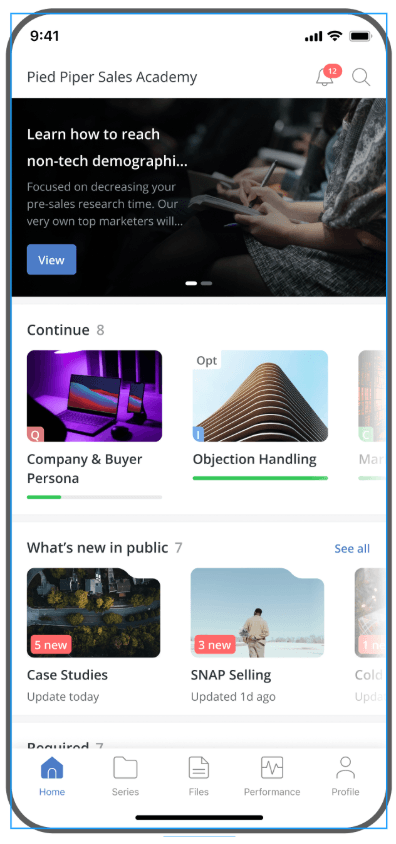
The feed also surfaces each rep's points, badges, and leaderboard rank — so progress is visible without reps having to go look for it. For managers, that same visibility makes it easier to spot who's engaged and who's falling behind.
4. Asset Hub: The right content, at the right moment
The mobile app gives your reps fast access to marketing-approved decks, one-pagers, videos, and battlecards. Reps can search, bookmark, and share assets directly from the app. Reps can also view engagement data on shared assets.
Find it fast, use it confidently: Reps in the field don't have time to dig through shared drives or chase down the latest deck version. Asset Hub gives them a searchable, organized library of marketing-approved content — decks, battlecards, one-pagers, videos — accessible from the mobile app. Assets are filterable by type, use case, and attributes, so a rep preparing for a competitive deal can pull the right battlecard in seconds rather than guessing which version is current.
Peer engagement signals take the guesswork out further. Reps can see how many times an asset has been viewed, downloaded, and bookmarked by colleagues, along with ratings on a 1–5 scale. If a pricing deck is trending across the team, that's a signal worth acting on before a buyer meeting.
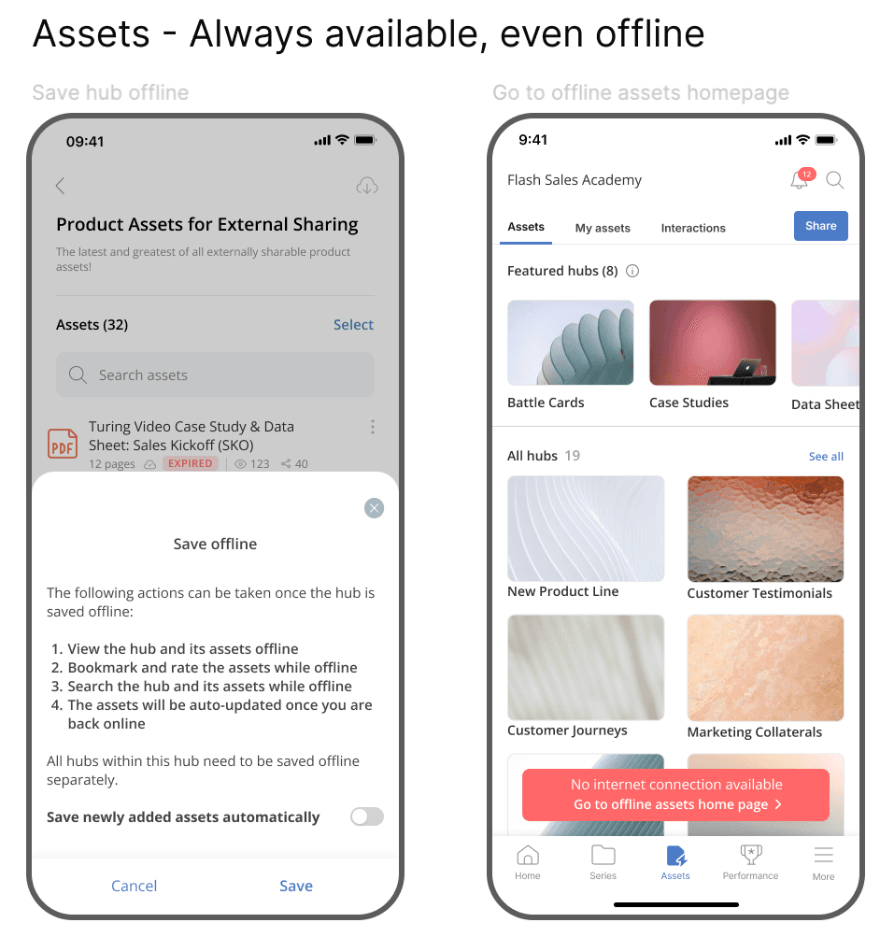
Always available, even offline: For reps in low-connectivity areas — manufacturing floors, field visits, back-to-back travel — Asset Hub works offline. Reps can save entire hubs or individual assets to their device while online, and access them without a connection when it matters. As soon as your device loses internet connection, you can view the following message on the Asset Hub homepage: “No internet connection available. Go to the offline assets home page.” Assets sync automatically when connectivity returns, so the version on their phone stays current without manual effort.
5. DSR Management on Tablet: Manage deals and buyers from anywhere
Field reps don't always have a laptop open between customer meetings. With the Mindtickle app on a tablet, reps can create, edit, and manage Digital Sales Rooms without going back to a desktop. Each DSR is a dedicated space for deal content, mutual action plans, and two-way chat with buyers — keeping deals moving between meetings, not just during them.
Buyers can access their room from any device. Reps manage from the tablet in landscape view, which suits the format for in-person and customer-facing work. Integrations and cloud storage connections are configured once on the web; after that, reps can pull content from those sources directly from the tablet.
6. Conversation Intelligence: Review, analyze, and share calls from your phone
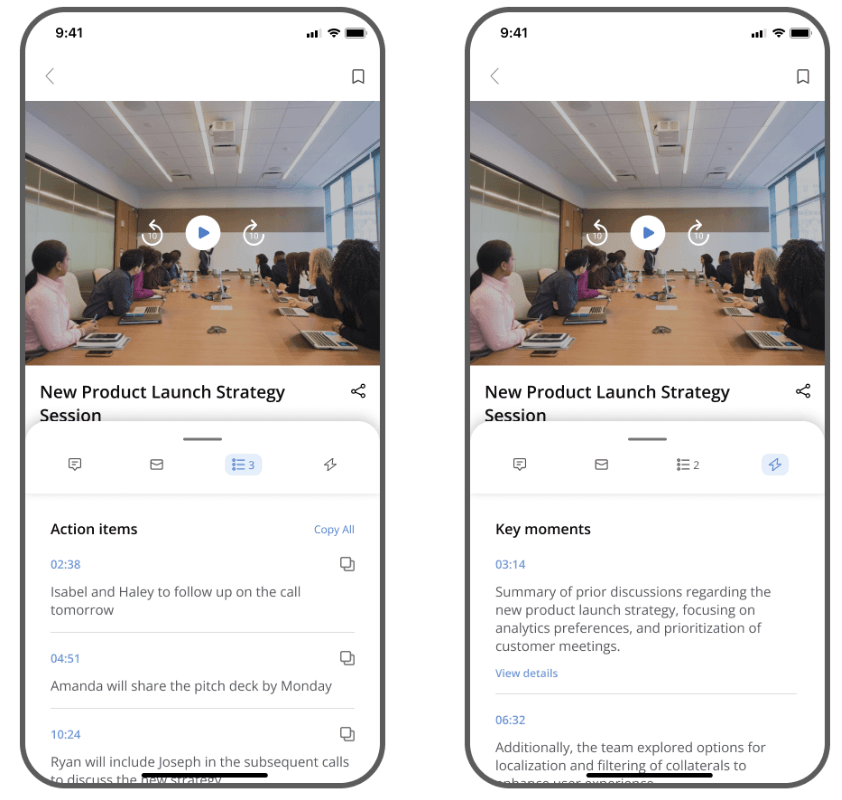
Review call recordings, transcripts, and AI-generated insights from the Call AI tab. Analyze themes, sentiment, and talk ratios to self-coach and improve. Managers can review and comment on calls directly from mobile.
After a customer call, the insights that matter most — what was said, what was missed, what needs to happen next — are only useful if reps and managers can act on them quickly. Waiting to get back to a desktop slows that down.
The Call AI tab on the Mindtickle mobile app gives reps access to call recordings, transcripts, AI-generated key moments, and action items from their phone. Sentiment analysis and talk ratio data let reps self-coach on delivery and conversation balance without needing a manager to flag it first.
Reps can also share recordings — full calls or specific snippets — with colleagues or buyers directly from mobile. Sharing a relevant call snippet with a new stakeholder, or passing a strong demo recording to a colleague, takes seconds rather than a desktop workflow.
Managers can review recordings, post timestamped comments, and tag team members on specific moments, all from mobile. Picture-in-picture mode lets them listen to recordings while multitasking on other apps.
🌐 Works Where Your Sellers Work — Even Offline
Role playing, assets, and coaching progress automatically when connectivity breaks. For managers reviewing submissions on the road, offline mode works the same way — evaluate, submit, and sync when back online.
One caveat worth communicating to your teams: offline
| Industry | Top Challenges | How the App Helps |
|---|---|---|
| Technology | - Large, distributed teams - Inconsistent training at scale - Manager bandwidth constraints | - AI roleplays between calls - Call AI review on mobile - No calendar time blocked Examples: Cisco, Darktrace |
| Healthcare & Pharma | - Field reps at point of care - Low-connectivity environments - Rapidly changing clinical content | - Offline access to training and assets - No laptop or signal required - Content stays current, syncs automatically Examples: Janssen India, Integrace Health |
| Automotive | - Reps sell from showroom floors - Certifications lapse without regular reinforcement - No desk access during selling hours | - Mobile training between customer interactions - Approved assets available during live conversations - Certifications completed on the go Example: International |
| Financial Services | - Compliance training disrupts selling time - Dispersed advisor teams - Mandatory but inflexible training schedules | - Bite-sized learning fits into advisor schedules - No dedicated training blocks needed - Completable on any device, anywhere |
| Manufacturing | - Low or no connectivity on-site - Field reps far from central resources - Channel partners hard to reach consistently | - Offline hubs for specs, talk tracks, training - Auto-syncs when back online - Works on factory floors and distributor sites |
Get Started in Minutes
Step 1: Download and Sign In
Download the Mindtickle app from the App Store (iOS) or Google Play (Android). Sign in using your company SSO, Salesforce, Google, or business email. Your account, content, and training sync automatically.
Step 2: Set Up Your Home Feed
Your home screen surfaces required training modules, recommended content, ongoing missions, and recent activity — prioritized for you. Tap any module to start or pick up where you left off.
Step 3: Access and Share Training and Assets
Navigate to the Learning or Assets tab to browse, search, and share training or marketing-approved content. Share assets directly with prospects or customers via link.
Step 4: Manage Digital Sales Rooms (Tablet)
Create or update a DSR for any active deal. Add relevant content, set up a mutual action plan, and share a unique link with your buyer.
Step 5: Prep and Debrief on Every Call
Before a call, open Seller Copilot to review account summaries, insights, and action items. After a call, visit the Call AI tab to review the recording, transcript, and AI-generated feedback.
Ready to Enable Your Team in the Field?
Download on the App Store · Get it on Google Play
Or book a demo to see the full platform in action.
About the Author
Group Product Manager
Ajitabh Pradhan is a product manager at Mindtickle focused on building AI-native experiences for the on-the-go seller that transform how revenue teams learn, coach, and perform. He leads initiatives spanning agentic AI platforms, semantic search, enterprise interoperability, and AI-powered seller productivity solutions. Passionate about turning emerging AI capabilities into scalable, customer-centric products, Ajitabh works at the intersection of product strategy, platform innovation, and user experience to help organizations unlock greater value from AI-driven revenue enablement.

Subscribe to the blog
Get the latest sales enablement tips, guides, and industry best practices delivered to your inbox. Unsubscribe anytime.