




What is a Digital Sales Room (DSR)? The Complete Guide for Revenue Leaders



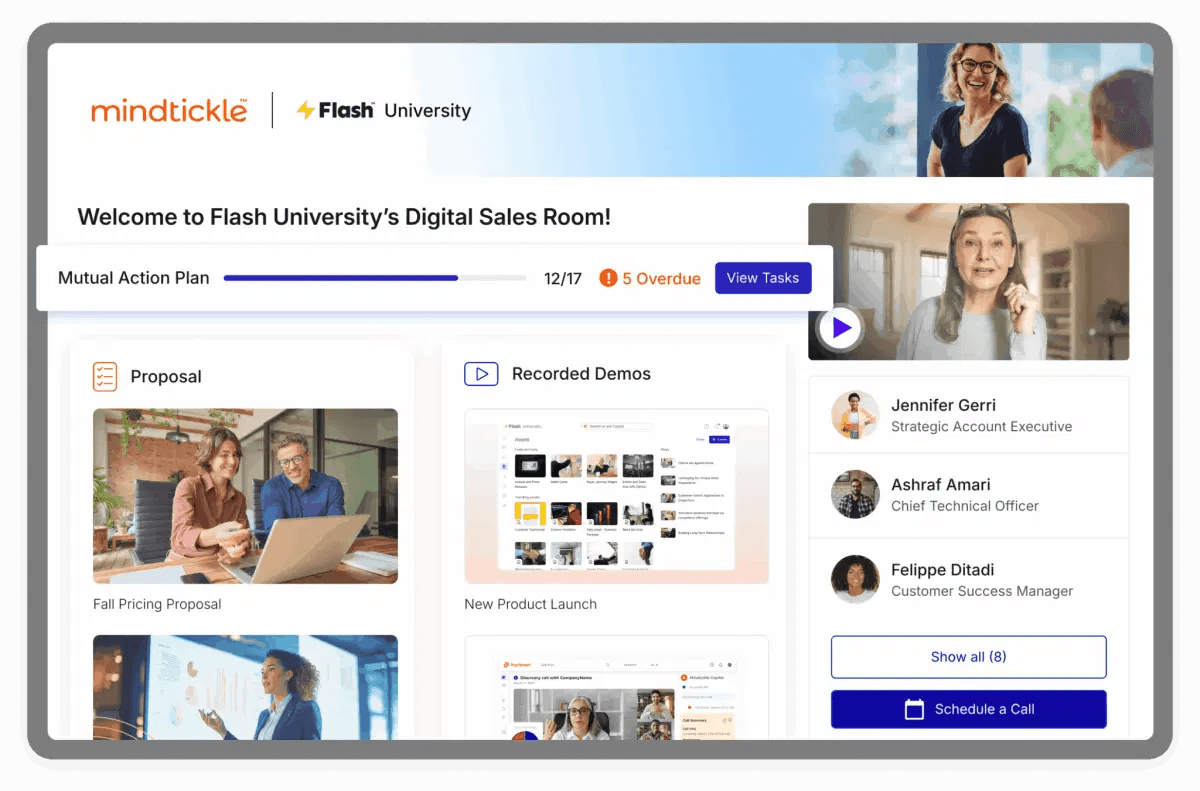
A Digital Sales Room (DSR) is a secure, personalized online space where a seller and a buying group share content, plan next steps, and work through a deal together. It replaces scattered emails and attachments with one link, and it shows the seller who on the buying side is engaging with what.
What revenue leaders should know before they invest:
- A DSR is a deal execution tool. Its value comes from how reps run it, not from the room itself.
- Rooms help most in deals with several stakeholders, long sales cycles, and formal evaluation steps.
- The fastest way to create one is from a template built for your sales motion, auto-filled from the CRM.
- Many rooms are never opened by buyers. Launching the room live on a call, with a mutual action plan, is the biggest fix.
- Measure adoption first (rooms viewed by buyers), then outcomes (win rate and cycle length on comparable deals).
Key takeaways
- A Digital Sales Room (DSR) is a secure, personalized web space where a seller and a buying group share content, agree on next steps, and work through one deal. It shows the seller who is engaging with what.
- Buyers now do most of their evaluation alone. 67% of B2B buyers prefer a rep-free experience, according to Gartner’s 2026 survey. A room gives them one current place to evaluate and agree, and gives sellers a view between calls.
- Most Digital Sales Rooms fail because of how reps use them, not the software. Rooms sent cold by email often go unopened. Rooms launched live on a call, with a mutual action plan the buyer helped write, get used.
- According to Mindtickle's 2026 State of Agentic Revenue Enablement Report, deals with a DSR close 30% bigger and 36% faster than deals without one. Those results depend on buyers actually using the rooms your team builds, which is where most DSR programs struggle.
What is a Digital Sales Room (DSR)?
A Digital Sales Room (DSR) is a private, branded web space a seller creates for one deal. It holds everything the buying group needs to evaluate and approve the purchase: the proposal, demo recordings, case studies, security documents, pricing, and a shared plan for getting to signature. The buyer gets one link they can forward internally. The seller gets a record of who opened what, when, and for how long.
The logic is simple. In a typical enterprise deal, the information a buyer needs is spread across dozens of email threads, calendar invites, and file attachments. Stakeholders who join late never see the earlier context. And the seller has almost no view of what happens on the buyer's side between calls. A DSR puts the deal's content and plan in one place that both sides can see.
- It’s shared. A CFO and an IT lead review the same live proposal, so everyone works from one current version.
- It’s collaborative. Buyers ask questions, complete their tasks in the mutual action plan, and bring in new stakeholders between meetings.
- It’s measurable. Every visit, view, and share becomes a signal the rep can act on.
Other names for a Digital Sales Room
You'll see the same concept described as a deal room, virtual deal room, sales microsite, buyer portal, or mutual workspace. Some vendors call the post-sale version a digital success room or customer room. The labels differ by vendor; the core function is the same.
📌 Here’s what a digital sales room is not
A content library. A content library holds every asset your company owns; a DSR holds only what one buying group needs for one decision.
A proposal or e-signature tool. A proposal is one document in the room; the room carries the whole evaluation around it.
A CRM. The CRM is your internal record of the deal; the DSR is the shared space the buyer actually uses, and it feeds engagement data back into the CRM.
Digital Sales Rooms compared with other ways of sharing deal content
| Shared folder | Marketing microsite | Digital sales room | |
|---|---|---|---|
| Built for | One team | A broad audience | One buying group, one deal |
| Updates | Replaces files manually | Rebuilt for campaign | Edit once; same link stays current |
| Buyer activity visible to seller | Little or none | Page views, anonymous | Who viewed which asset, and for how long |
| Collaboration | Comments on files | None | Chat, shared action plan, stakeholder invites |
| Lifespan | Until someone cleans it up | Campaign length | Whole deal, often into onboarding and renewal |
Why do Digital Sales Rooms matter in 2026?
Digital sales rooms matter because B2B buying now depends on a larger buying group, and most of that work happens between calls, when the rep isn’t there.
Buying groups are bigger and research on their own
Forrester’s State of Business Buying, 2026 found that a typical purchase involves 13 internal stakeholders and nine external influencers. Many of them, such as finance, legal, and procurement, may never join a sales call, so the champion ends up carrying the deal internally. The same research found that 94% of buyers use AI during the buying process and then check what it tells them against trusted sources. A digital sales room gives the whole group one verified place to find current pricing, security documentation, and approved answers. Read: How to Manage Complex B2B Deals with Multiple Stakeholders Using DSRs
Consensus decides the deal
In a 2025 Gartner survey of B2B buyers, 74% of buying teams showed unhealthy conflict during the decision process, and teams that reached consensus were 2.5 times more likely to report a high-quality deal. Helping a buying group reach that agreement on its own is what buyer enablement looks like in practice. A good room supports it by giving each stakeholder role-specific detail around one shared business case and plan.
Email hides the buyer’s side of the deal
Once a proposal goes out as an attachment, the rep has no record of who opened it, who forwarded it to the CFO, or whether legal has reviewed the security pack. A DSR captures that buyer-side activity across the whole group and writes it back to the CRM, so forecasts reflect what buyers are actually doing.
Gartner predicts 30% of B2B sales cycles will run through a DSR by 2028.
Digital sales rooms are on track to become a primary channel for B2B deals, and the teams already seeing results are the ones whose buyers actually use their rooms. Gartner’s forecast, as cited in Mindtickle’s 2026 State of Agentic Revenue Enablement Report, also expects rooms to manage the entire customer lifecycle.
Getting those results depends on how teams run them. In Mindtickle’s analysis of G2 reviews, one reviewer noted that some clients still ask for PDFs of content already sitting in the room. The room existed, but the buying group kept working the old way. Teams that get results build rooms early and keep referring to them on calls, which is what the rest of this guide covers.
How does a Digital Sales Room work?
A room follows the deal from first meeting to signature, and often beyond. The typical flow:
- The rep creates the room from a template and the CRM fills in the account name, logo, and known contacts.
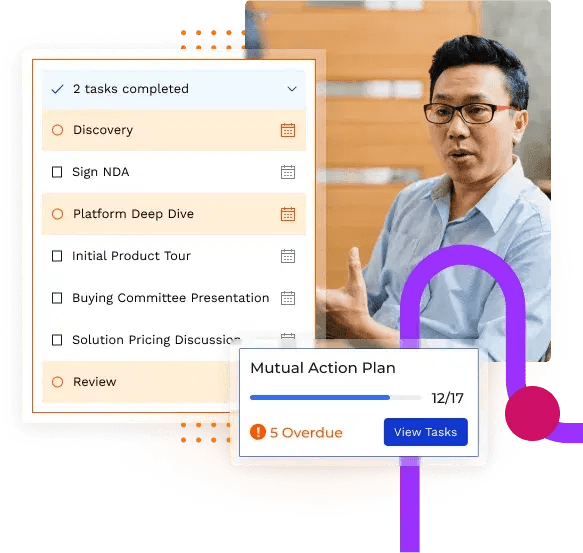
- The rep adds content for this deal and drafts a mutual action plan.
- The rep walks the champion through the room on a live call, then shares the link.
- The champion invites colleagues from finance, IT, legal, and procurement.
- Each visit, download, and question is logged and sent to the rep, the manager, and the CRM.
- The rep updates the room after every interaction, so the link always shows the latest version.
- After signature, the room becomes an onboarding space owned by customer success.
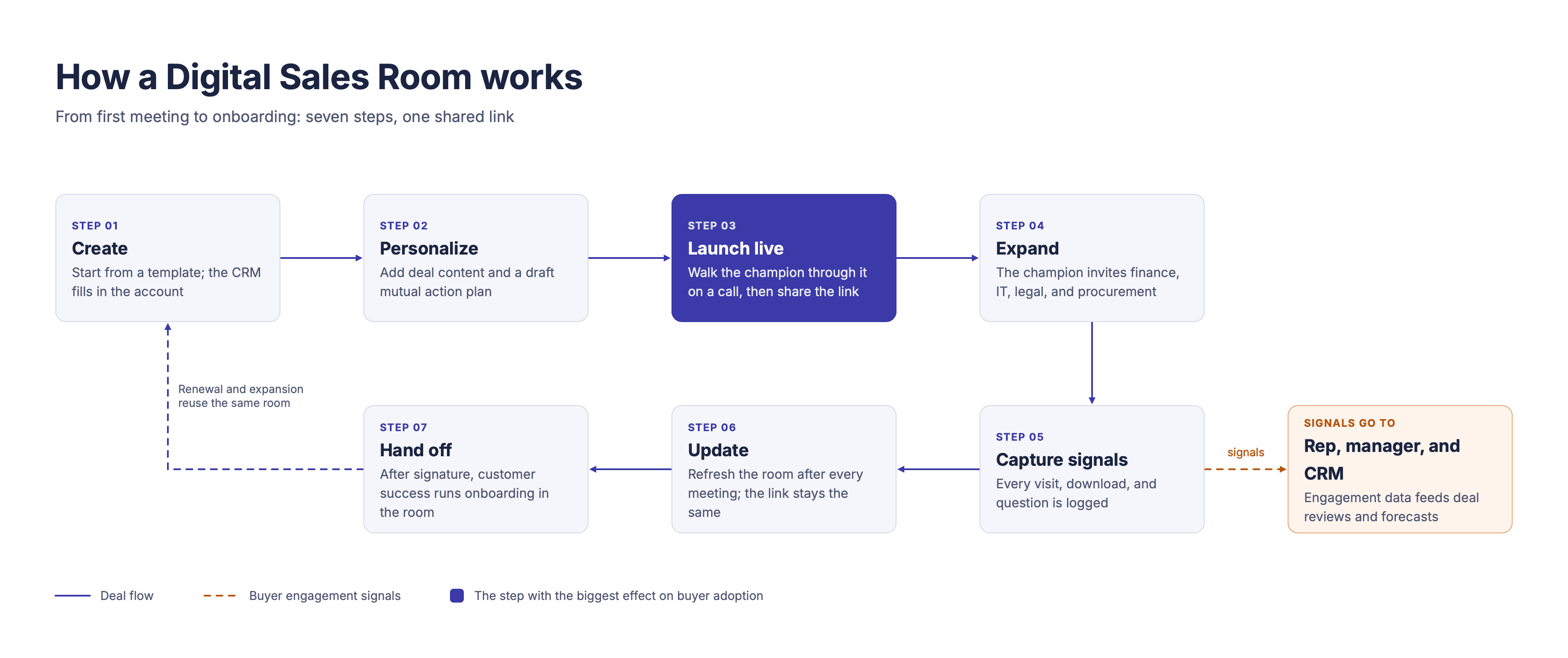
The rep keeps updating the room as buyers engage, and strong teams refresh it after every call so buyers have a reason to come back.
- What the buyer sees
The buyer opens a page with their company's logo, a short welcome video from the rep, and sections organized around their evaluation: the problem in their words, the proposed solution, proof from similar customers, the commercial terms, and the plan to get to a decision. Good rooms don't force a software download. A buyer can ask a question in the room, and the answer is visible to everyone on the buying side.
- What the rep and manager see
Behind the room is an activity view. Reps see which stakeholders have visited, which assets they spent time on, and when someone new from the account appears. Managers see the same data across the team's pipeline: which deals have an active buying group, which mutual action plan tasks are overdue, and which rooms have gone quiet. That shared view changes the deal review. Instead of asking a rep how a deal feels, a manager can ask why someone expected to engage hasn't engaged yet.
📌 Eight components of a high-performing room
The business case: what Digital Sales Rooms deliver for revenue leaders
A DSR earns its budget when it changes deal outcomes leaders already track: win rate, cycle length, forecast accuracy, and the cost of selling. Each leader gets something different from the same room data.
| Role | What they get from DSRs | Metric to watch |
|---|---|---|
| CRO or VP of Sales | Earlier warning on stalled deals; forecast calls based on buyer activity, not rep confidence | Win rate, forecast accuracy, slip rate |
| Sales enablement | Data on which content buyers use in won deals; a consistent deal process across reps | Content used in won vs. lost deals, rep adoption |
| Revenue operations | Buying-group contacts written back to the CRM; buyer engagement as a deal-health input | Contacts per opportunity, data completeness |
| Front-line sales manager | Coaching on live deals using real buyer behavior | Rooms with active buying groups, overdue action plan tasks |
| Customer success | Full deal context at handoff; a ready-made space for onboarding and renewal | Time to first value, renewal rate |
🏆 How GoTo improved win rates by 35% with digital sales rooms
After a string of acquisitions left GoTo’s reps juggling too many tools, the enablement team moved everything into Sales Compass, a single platform built on Mindtickle. Digital Sales Rooms quickly became the part reps relied on most. Whenever a champion forwarded a room to a colleague, that person was added to Salesforce automatically, so reps saw the full buying group without chasing it.
The results: a 35% improvement in win rates, 437 new contacts created automatically, and 9,000 assets shared with buyers.
Tara Medeiros, former Senior Director of Sales Enablement at GoTo, said:
“We had three deals that were really on the line, totaling just under two million ACV. All three of those deals cited the DSRs as being a competitive advantage because it presented so well and so buttoned up and allowed communication flow to be that much easier.”
How to create a Digital Sales Room, step by step
The steps below assume your DSR platform connects to your CRM.
- Map the buying group. List every person you know is involved, their role in the decision, and what each one needs to see. Mark the gaps; the room will help you fill them.
- Start from a template for the sales motion. New-logo, expansion, renewal, and partner deals need different structures. A template keeps reps consistent and saves setup time.
- Personalize from the CRM. Pull in the account logo, contact names, and opportunity details automatically. Then write a two- or three-sentence summary of the buyer's goals in their own words.
- Organize by stakeholder, not by file type. Create sections such as "For finance" and "For IT and security" instead of "Videos" and "PDFs." Each reader should find their material in seconds.
- Draft a mutual action plan. List the steps to a decision, with an owner on each side and a date. Treat it as a draft to agree with the champion, not a finished plan.
- Record a short welcome video. Keep it under 90 seconds. Say why the room exists and what you'd like the buyer to do first.
- Set access and permissions. Decide who can view, whether the link expires, and which documents need extra protection, such as pricing or contracts.
- Launch the room live. Share your screen on a call, walk the champion through it, and agree on the action plan together. Then send the link. Rooms introduced this way are far more likely to be used than rooms sent cold by email.
💡Did you know
In Mindtickle’s 2026 State of Agentic Revenue Enablement Report, the content that appeared most often in won deals was datasheets, micro demos, and customer testimonials. Each one answers a question buyers need settled before they commit, whether that’s how the product works or whether it delivered for a company like theirs. A few assets like these, matched to the stage the deal is in, keep a room focused in a way that a full library never will.
How do teams use Digital Sales Rooms across the deal cycle?
A DSR does a different job at each stage, and getting each one right helps shorten the sales cycle.
Prospecting and early discovery
The room replaces the follow-up email with a single link that includes a short video, the discovery recap, a sales pitch deck tailored to the prospect, and a few supporting assets. Note that timing matters here. A room that arrives while the conversation is fresh gets used, while one that arrives a week later competes with everything else in the inbox.
Evaluation and multi-stakeholder buy-in
This is where rooms do their heaviest lifting. As finance, IT, and end users join, each finds role-specific content and the same business case, so the champion no longer retells the rep’s story in every hallway conversation.
💡Did you know
When Sirion, a contract lifecycle management company, went after a Fortune 100 buying group spread across multiple business units, its team faced a familiar challenge: how do you keep a large, complex buying group engaged without chasing every stakeholder individually?
Instead of relying on endless follow-ups, Sirion created a shared space on Mindtickle using Digital Sales Rooms. Every stakeholder could explore the evaluation materials on their own time, bringing the buying process into one accessible space.
The results spoke for themselves. More than 100 people visited the room, logging over 1,000 hours of engagement independently. Even after the deal closed, several stakeholders reached out simply to share their appreciation for the experience.
At a case study session during Gartner’s 2023 CSO and Sales Leader Conference in Las Vegas, Gordon Thompson, Sirion’s EVP of Presales and Business Strategy, and Nick Salas, Senior Director of Global Enablement, shared how Mindtickle-powered Digital Sales Rooms changed the way their team sold and how buyers engaged with their offerings.
Proposal, negotiation, and close
Late-stage deals stall on version confusion and procurement surprises. A room keeps one current proposal and contract in front of everyone, while the mutual action plan tracks legal, security, and approvals. When a step slips, the rep sees it before it becomes a forecast miss. Clearing these late-stage blockers is one of the most practical ways to drive sales acceleration without putting more pressure on the buyer.
Renewal and expansion
After signature, the same room passes from the rep to customer success, and the action plan becomes an onboarding plan. Customer success can then use the room for customer enablement, sharing training and adoption resources with the people who signed. When renewal comes around, the full deal history is already there.
How to read buyer signals and what to do next
| Signal in the room | What it often means | What your rep should do |
|---|---|---|
| A new person from the account visits | The buying group is bigger than you thought | Find out their role; add a section for them |
| Pricing viewed repeatedly by several people | Budget discussions are happening internally | Offer a call to walk through options before they decide without you |
| Champion forwards the room to an executive | The deal is moving up the chain | Send the executive a short personal note and offer a 15-minute briefing |
| Security pack opened by IT | Technical review has started | Introduce your security lead; set a date in the action plan |
| No activity for seven days or more | Momentum has dropped, or the deal has moved to another channel | Call the champion; ask what changed. Don't send another "just checking in" email |
🎯Pro tip
Room activity gives front-line managers something better than a rep's opinion in deal reviews. Pick three late-stage deals each week and look at the room together: who's engaged, which action plan tasks slipped, and which stakeholders are missing. That turns a forecast call into a coaching conversation about what the rep will do next.
Why Digital Sales Rooms fail and how to avoid it
Most DSR programs that struggle have the same root cause. Rooms get built and shared once, then left behind while the deal moves on without them. The failures follow predictable patterns, and each one has a fix you can build in from the start.
| What goes wrong | Why it happens | The fix |
|---|---|---|
| Rooms are sent cold and never opened | The link arrives in an email with no context | Launch every room live on a call and explain how the buyer will use it |
| Rooms turn into content dumps | Reps upload everything that might be relevant | Start from templates with curated, stage-specific content; remove what buyers skip |
| Buyers never contribute | The room is built around the rep’s needs and gives buyers nothing to do | Co-own the mutual action plan with the champion and invite questions in the room |
| Rooms go stale | Nobody updates the room after the first share | Update the room after every call and reference it in every conversation |
| Buyers feel uneasy about tracking | Engagement data is used carelessly or quoted back to them | Be open that the room shows activity and never mention specific clicks to a buyer |
| Managers never inspect rooms | Room data lives outside pipeline reviews | Review room engagement and mutual action plan progress in every deal review |
| Reps were never trained to run rooms | Training stopped at "here is the tool" | Train reps to introduce a room and run a plan, then let them practice with an AI role play tool |
| Tool sprawl | The room is one more disconnected tool | Choose a room that lives inside the CRM and enablement workflow reps already use |
How to measure Digital Sales Room success
Measure in order: adoption, then engagement, then outcomes. Outcome data means little until reps actually use rooms and buyers actually visit them. We call this the four-tier DSR metrics framework.
| Tier | Metric | How to calculate | What good looks like |
|---|---|---|---|
| Adoption | Room coverage | Qualified opportunities with a room ÷ all qualified opportunities | Rising every month of rollout |
| Adoption | Buyer activation | Rooms with at least one buyer visit within 48 hours of sharing ÷ rooms shared | The single best early indicator of rep execution |
| Engagement | Active stakeholders | Distinct buyer-side visitors per room | Matches or exceeds the known size of the buying group |
| Engagement | Action plan health | Action plan tasks completed on time ÷ tasks due | Falling numbers flag deals at risk |
| Outcomes | Win rate | Won ÷ closed, for deals with active rooms vs. comparable deals without | The headline number for the CRO |
| Outcomes | Cycle length and slip rate | Days from room creation to close; share of deals pushed past forecast date | Shorter and fewer slips |
| Content | Asset influence | Share of won deals in which buyers opened each asset | Tells enablement and marketing what to keep and what to retire |
📊 Do you know?
Mindtickle’s 2026 State of Agentic Revenue Enablement Report shows that digital sales rooms tied to won deals averaged 7 visits per buyer, against 3.7 in lost deals. This makes buyer engagement in the room a useful early signal of how a deal is going.
A simple way to model the return
A useful ROI model needs a defensible before-and-after on a metric leadership already tracks.
Incremental revenue = Opportunities with a room × Average deal size × (Win rate with rooms − Win rate without rooms)
📌 For example: a team works 100 opportunities a year, each worth $50,000, and wins 20% of them. That’s 20 deals, or $1 million. If rooms lift the win rate to 25%, the team wins 25 deals, or $1.25 million. That’s an extra $250,000, before counting any gains in deal size or speed. Subtract what you spend on the platform and its rollout to get the net return.
Note: These figures are only an illustration, so use your own opportunity counts, deal sizes, and win rates. A model built on your own numbers holds up far better in a finance review than an industry average.
AI in Digital Sales Rooms
AI has cut the work of building and maintaining rooms. In 2026, these uses are common across DSR platforms:
- Drafting a room from call recordings and CRM data, including the recap, stakeholder sections, and a first-draft action plan.
- Recommending content for the deal's stage, industry, and stakeholders.
- Summarizing buyer activity across a pipeline so managers see which deals need attention.
- Flagging deal risk when engagement drops or a key stakeholder goes quiet.
- Answering buyer questions inside the room from approved content.
- Connecting room data to other AI tools and assistants through standards such as the Model Context Protocol (MCP).
Keep in mind
This matters because buyers are using AI too. When 45% of buyers have used AI in a recent purchase, as Gartner found, the room is often where they check what an AI assistant told them against what your team actually committed to.
Guardrails for AI in buyer-facing rooms
Anything AI writes for a buyer should pass a rep's review before it's published. Restrict AI answers to approved content, so a room never quotes a feature you don't have or a price you didn't offer. And check where room data is processed and stored, especially in regulated industries.
📌 Dive deeper: AI Data Security: How Mindtickle Protects Your Data
How do Digital Sales Rooms manage security, privacy, and buyer trust?
A digital sales room often holds a company's most sensitive deal material: custom pricing, contract terms, and security documentation. Before rollout, confirm your platform supports role-based permissions, link expiry, access limited to approved email domains, download controls or watermarking for sensitive files, and an audit trail of who accessed what. Ask for the vendor's SOC 2 report and data processing terms, and check GDPR obligations if you sell into Europe.
Privacy is also a trust question. Buyers know rooms show activity, and some are uneasy about it. Be open about it: a line in the welcome note such as "this room lets us see which sections are useful, so we can tailor what we share" is enough.
Then use the data the way you'd want it used on you. A rep who opens with "I noticed you looked at pricing three times" will make the buyer stop visiting. A rep who asks "what questions is your finance team likely to have?" gets the same information and keeps the trust.
How to choose Digital Sales Room software
Start with where the room will live in your stack. DSR capability comes in three forms, and the right one depends on the problem you're solving.
| Type | Best for | Strengths | Trade-offs |
|---|---|---|---|
| Standalone DSR tools | Teams that want a room quickly, with few other needs | Fast setup, focused feature set | Another tool for reps to adopt; content and training sit elsewhere |
| DSRs inside a revenue enablement platform | Teams that want rooms tied to content, training, coaching, and deal insights | One content library, rep readiness and buyer engagement in one place, data across the full deal | Larger rollout; more value when several capabilities are used |
| DSRs inside CPQ, proposal, or contract tools | Teams whose main pain is quoting and signing | Strong pricing, document, and e-signature flows | Weaker on early-stage engagement, content governance, and coaching |
DSR software evaluation checklist
- Buyers can open the room without creating an account or downloading software
- Rooms auto-fill from your CRM, and activity writes back to it
- New buying-group contacts are identified and added to the CRM
- Mutual action plans with owners and dates on both sides
- Engagement analytics by person and by asset, with manager-level views across the pipeline
- Templates by sales motion, with content pulled from an approved, governed library
- AI that drafts rooms and recommends content, with human review before publishing
- Permissions, link expiry, audit trails, and current security certifications
- Support for training and certifying reps on running rooms
- Rooms that carry over to onboarding, renewal, and expansion
- Clear total cost, including implementation and admin time
10 questions to ask Digital Sales Room vendors
The criteria that matter most are two-way CRM sync, native mutual action plans, detailed engagement analytics, fast room creation, strong security and AI guardrails, and a link to coaching. These questions help you test each one in a demo.
- How does engagement data reach our CRM, and which objects and fields does it update?
- Show us how a rep creates a personalized room from an opportunity. How long does it take?
- How do mutual action plans work for the buyer, and what happens to them after the deal closes?
- What engagement detail can a rep see for each stakeholder and each asset?
- How does the platform identify and record stakeholders we have not met?
- How do buyers access the room, and what controls exist for sensitive sections?
- What do your AI features do, what content do they draw from, and how do admins control them?
- Is our data ever used to train AI models, and where is it stored and processed?
- Which security certifications do you hold, and can you share the reports?
- How do room engagement signals connect to rep coaching, training, and forecasting?
⚖️ Evaluate Now: Best Digital Sales Room Platforms for 2026
How Mindtickle helps teams win with Digital Sales Rooms
Mindtickle Digital Sales Rooms launch in minutes from templates built for specific sales motions, regions, and verticals. Reps share content with buyers, see which stakeholders engage with what, and keep deals moving with mutual action plans that alert reps and managers when steps fall overdue.
If you're shortlisting Digital Sales Room software, look at what surrounds the room as well. Mindtickle Digital Sales Rooms are part of its revenue enablement platform that includes coaching, conversation intelligence, and sales content management. So when a deal stalls, a manager can see where it stalled in the room and coach the rep on the fix in the same platform, instead of piecing it together from separate tools.
Rooms Don’t Close Deals. Reps Do.
Give your reps Digital Sales Rooms that come with the content, coaching, and deal insights to run them well.
Frequently asked questions
About the Author
Lead Content Marketer
Jayadeep brings over a decade of experience in B2B content and product marketing, with expertise in editorial leadership, messaging strategy, and agency management.
He has built and scaled content operations, led agency partnerships, and collaborated across marketing, product, and demand generation teams to deliver integrated campaigns. His "process-first, execution-next" philosophy has made him a trusted resource at Mindtickle, where he helps shape content strategy, thought leadership programs, and flagship marketing initiatives.
Subscribe to the blog
Get the latest sales enablement tips, guides, and industry best practices delivered to your inbox. Unsubscribe anytime.